
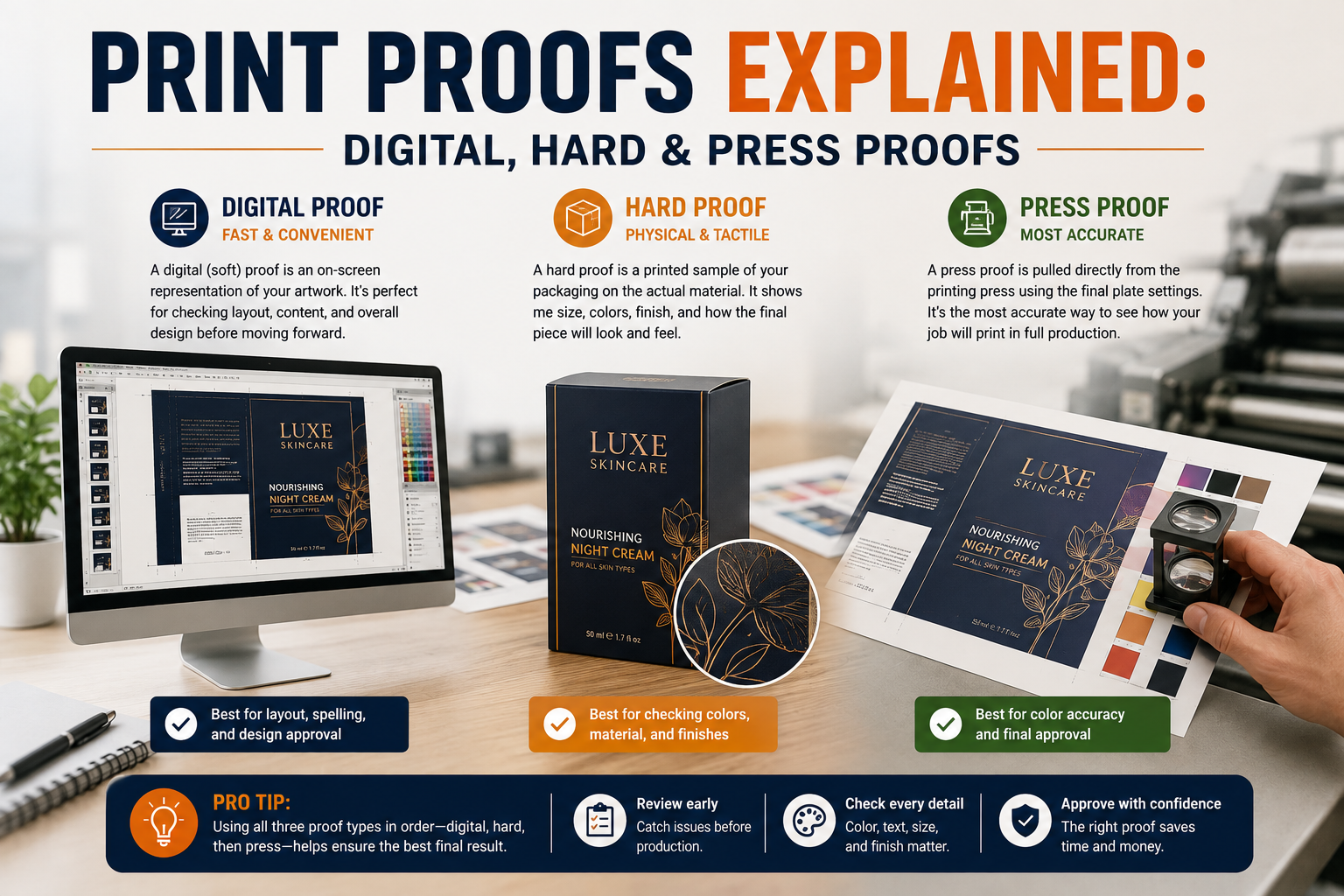
What is a print proof? It’s a sample of your printed box. You see it before the full production run. It lets you catch problems while they’re still cheap to fix. Proofs come in three main types. A digital proof is an on-screen or PDF file. A hard proof is a physical, color-calibrated printed sample. A press proof gets pulled from the actual production press itself. Each type checks something different. Mixing them up is a common cause of mismatched full runs. The brand ends up with a batch that doesn’t match what they expected.
This article covers what is a print proof at each stage. It covers what to actually check before signing off. It also covers the one color mistake that catches brands who skip straight to a full run.
What Is a Digital Proof?
A digital proof is a PDF or on-screen file showing the layout, text, and overall design. It’s fast and free to produce, since it doesn’t involve any physical printing. That makes it the first proof stage in almost every project. It’s usually the first place you can see what is a print proof looking like for your box.
A digital proof is good for checking content. Spelling, layout, image placement, and overall composition all show up clearly on a digital proof. What a digital proof can’t do reliably is confirm exact color output. Screens display color differently than printed material does. That’s true no matter how well-calibrated the monitor is. Keep this limit in mind when you’re asking what is a print proof supposed to catch this early.
What Is a Hard (Contract) Proof?
A hard proof, sometimes called a contract proof, is a physical printed sample. It’s calibrated to represent the color output of the final printed piece as closely as possible. This is the stage where color gets checked for real, not estimated from a screen.
Signing off on a hard proof means agreeing to what the final printed color should look like. If the full run comes back looking different, that’s a legitimate reason to flag it with the printer. Keep the signed hard proof on file as your reference point.
What Is a Press Proof?
A press proof is the most accurate option. It’s also the most expensive and slowest to produce. It gets pulled directly from the actual production press. It uses the real inks and stock for the run, before the full batch prints. It comes straight off the real press. A press proof reflects exactly what the full run will look like.
Press proofs make sense for large runs and tight brand-color standards. They’re also worth it for projects where any color deviation would be costly. For most standard runs, a hard proof provides enough accuracy without the added cost and time.
The Color Mismatch Problem Most Guides Skip
Here’s a mistake that catches more brands than any other. It’s approving a digital proof only, then skipping straight to a full production run. A digital proof was never built to confirm color. Screens use backlit RGB. Printed packaging uses reflected CMYK or spot color. Those two systems don’t translate perfectly. This holds true no matter how good the monitor is.
Most guides mention proof types without flagging this risk. They don’t say that skipping the hard-proof stage is exactly how color problems slip through. A tight timeline makes this mistake tempting. It’s also the single most common reason a full run comes back looking different. The brand approved one thing and got another.
I’ve seen a brand approve a digital PDF proof under a tight launch deadline. They skipped the hard proof entirely to save time. The full production run came back in a noticeably different shade than what they’d seen on-screen. Nothing was technically wrong with the file. The digital proof simply couldn’t represent the actual CMYK output. On the reprint, they requested a physical hard proof before signing off. That caught the same mismatch early, and the final run matched expectations.
If you’re asking what is a print proof actually worth checking for, color is only part of it. The next section covers the rest.
What Is a Print Proof Actually Checking For?
Checking a proof means more than a quick glance. Color is the obvious one, especially on a hard or press proof. Layout and text accuracy matter just as much. A typo or misaligned logo is just as costly as a bad color.
Dieline and fold alignment deserve a check too. Our guide to what a dieline actually is covers this template in more detail. It maps every cut and fold line on the flat sheet. A proof should show the printed graphics lining up correctly against those same lines. They shouldn’t just float in the general area.
The cutting stage matters here as well. Our guide to how die cutting works explains how the process shapes the finished box. A blade or laser follows that same dieline. A proof that looks fine on a flat sheet can still print with graphics that drift. That drift often only shows up once the piece is cut and folded to size.
Digital vs. Hard vs. Press Proof: Quick Comparison
| Factor | Digital Proof | Hard Proof | Press Proof |
|---|---|---|---|
| Confirms | Layout, text, content | Color, physical output | Exact final press output |
| Cost | Free/low | Moderate | Highest |
| Speed | Fastest | Moderate | Slowest |
| Best for | Content check | Most standard runs | Large or color-critical runs |
Common Mistakes When Approving a Print Proof
Most of these mistakes trace back to one question: what is a print proof supposed to confirm. Mixing that up is where things go wrong.
The first mistake is approving a digital proof as if it confirms color. It doesn’t. Request a hard proof for anything where color accuracy actually matters.
The second mistake is rushing the proof stage to save time on a tight deadline. A skipped hard proof often causes a reprint. That reprint ends up costing far more time than the proof would have.
The third mistake is checking only color and missing dieline or fold alignment. A proof that looks perfect flat can still print with graphics misaligned to the fold lines once assembled.
A fourth mistake is treating every run the same way. A low-color-sensitivity project might not need a press proof. A brand-critical color standard might need one every time. Match the proof type to what’s actually at stake.
A fifth mistake is losing track of which proof version got approved. On projects with multiple rounds of changes, it’s easy to sign off on an outdated file by mistake. Keep every proof version labeled and dated. Confirm the printer is working from the exact one that got approved.
Which Should You Choose?
Running a standard order where layout matters more than exact color? A digital proof, followed by a hard proof before the full run, covers what most projects need.
Running a large batch or a project with strict brand-color standards? A press proof is worth the extra cost and time. It reflects exactly what the final run will look like.
Not sure which proof stage fits your project? Easy Box Packaging can walk through digital, hard, and press proof options. That includes matching the choice to your run size and color sensitivity. Industry guidance from PRINTING United Alliance covers similar proofing standards used across commercial print.
What is a print proof, at the end of the day? It’s the cheapest insurance available before a full run locks in. Skipping the right proof stage to save a few days rarely pays off. A mismatched run almost always costs more than the proof would have.
Print Proof: FAQ
What is a print proof used for? It’s a sample shown before the full production run. Layout, text, and color can be checked and approved while changes are still cheap to make.
Is a digital proof enough to approve a print run? Not for color. A digital proof confirms layout and content well, but screens can’t represent printed CMYK or spot-color output accurately. Request a hard proof for color-sensitive runs.
What’s the difference between a hard proof and a press proof? A hard proof is a calibrated sample meant to represent final color. A press proof comes straight from the production press. That makes it the most accurate but also the most expensive option.
How many rounds of proofing does a box order need? Most standard orders use one digital proof for layout. They follow it with one hard proof for color. Color-critical or large-volume runs sometimes add a press proof as a third check.
Get a free quote — dieline and design support included.